
Lead Product Designer • 2019-2021
The National Institutes of Health: Biomedical Translational Research Information System (BTRIS)
BTRIS is the NIH's centralized clinical research data system—managing over 600,000 research subjects across 10,000+ protocols. The legacy platform was difficult to use, expensive to maintain, and inaccessible to external researchers. I led the UX strategy to modernize the interface, decouple reporting from IBM Cognos, and reduce onboarding friction.
BTRIS Reports
On-Demand, Customizable Reports to Accelerate Research and Clinical Insights
BTRIS reports provide researchers and clinicians with on-demand access to comprehensive, de-identified or identified patient data, tailored to their study protocols. These customizable reports streamline data analysis, support evidence-based decisions, and enhance research efficiency—all within a secure, compliant framework.
Quickly select protocols and custom subject Lists
Stakeholders can select from their curated list of protocols and subjects both identified or de-identified.
Share with other researchers
BTRIS makes it easy for researchers to collaborate by allowing secure sharing of subject lists and reports with authorized team members. Investigators can share data with colleagues who are part of the same IRB-approved protocol, ensuring compliance while fostering cross-disciplinary research.







Project Overview
My Role
Lead Product Designer
Team
Agile Development Team (5-7 developers), NIH stakeholders, and end-users
Platform
Web Application (React-based; IBM Cognos integration deprecated)
Tools
Visual Studio Code, Sketch
Timeline
~2 years
Goal
Modernize a legacy NIH web application, reduce onboarding friction, decouple reporting from IBM Cognos, and expand accessibility to academic institutions
Transforming a Legacy Platform Through UX-Centered Innovation
Modernizing the Interface While Cultivating a Design-First Culture
Migrated a legacy, static UI to a modern, responsive React-based interface.
Replaced IBM Cognos reporting UI with native React components to streamline workflows and reduce costs.
Lowered the learning curve through intuitive navigation, inline guidance, and progressive disclosure.
Introduced Sketch and collaborative prototyping workflows to a developer-led team unfamiliar with UX.
Helped establish a shared component library to standardize design and minimize rework.
Facilitated regular cross-functional design reviews to align stakeholders and developers around user needs.
My Approach
As the sole designer, I led user interviews, heuristic evaluations, and stakeholder workshops to uncover pain points and opportunities. With no direct access to the original legacy application, I reverse-engineered functionality by observing workflows and discussing usage patterns with active NIH researchers.
BTRIS User Flow Diagram
BTRIS serves as the NIH’s enterprise data repository, and understanding its structure was my first priority. I began by engaging with stakeholders and reviewing some outdated, often unclear diagrams. Through those conversations and materials, I discovered that BTRIS centralizes data from a wide range of source systems. To clarify the system’s architecture and improve alignment, I developed a redesigned diagram that provided a much clearer view of the overall data flow and helped orient me to the process.

Low Fidelity Block Framing for Rapid Validation
To streamline collaboration and reduce visual noise, I developed block-frame wireframes early in the design cycle. These helped to:
Drive discussions focused on layout and flow, rather than pixel-level details
Rapidly iterate on core workflows like protocol selection and data verification
Align technical feasibility with user needs early in the process

BTRIS' Legacy Active Protocol Subject Screen


Block-frame with Annotations of Active Protocol Subject Screen

Hi-Fidelity UI Implementation
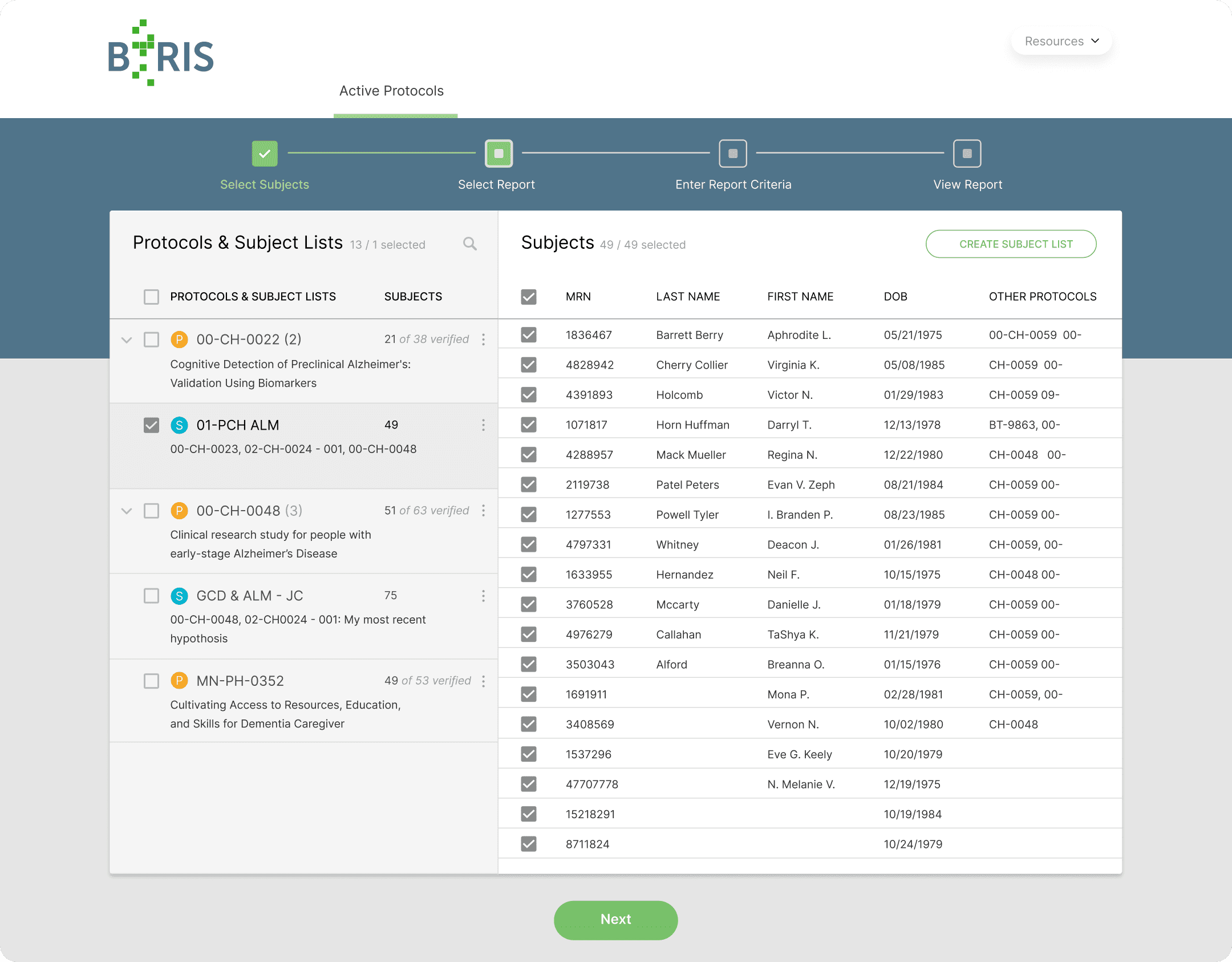
After achieving consensus through wireframes, I evolved the designs into high-fidelity mockups with clear visual hierarchy, modern interaction patterns, and BTRIS branding.
Final Hi-Fidelity Active Protocol Subject Screen
Key Workflow Improvements
Note: While login, access, and report generation screens are not detailed in this case study, they followed the same user-centered design approach:
Login & Access: Simplified authentication with intuitive guidance for first-time users.
Protocol Selection: Reimagined selection flow with real-time filtering and clear confirmation modals.
Report Generation: Replaced IBM Cognos with a custom, flexible reporting interface supporting dynamic filters and field selection.
Review & Export: Consolidated review and export steps with intuitive formatting and support for PDF and Excel outputs.
Impact
Metric
Improvement
Support Tickets
Estimated reduction of 40-50% due to improved UX clarity
Annual Licensing Costs
$0 (eliminated IBM Cognos dependency)
Onboarding Time for Researchers
Reduced from an estimated 2-3 weeks to under 1 week
System Scalability
Enabled future expansion to academic institutions and non-NIH collaborators